


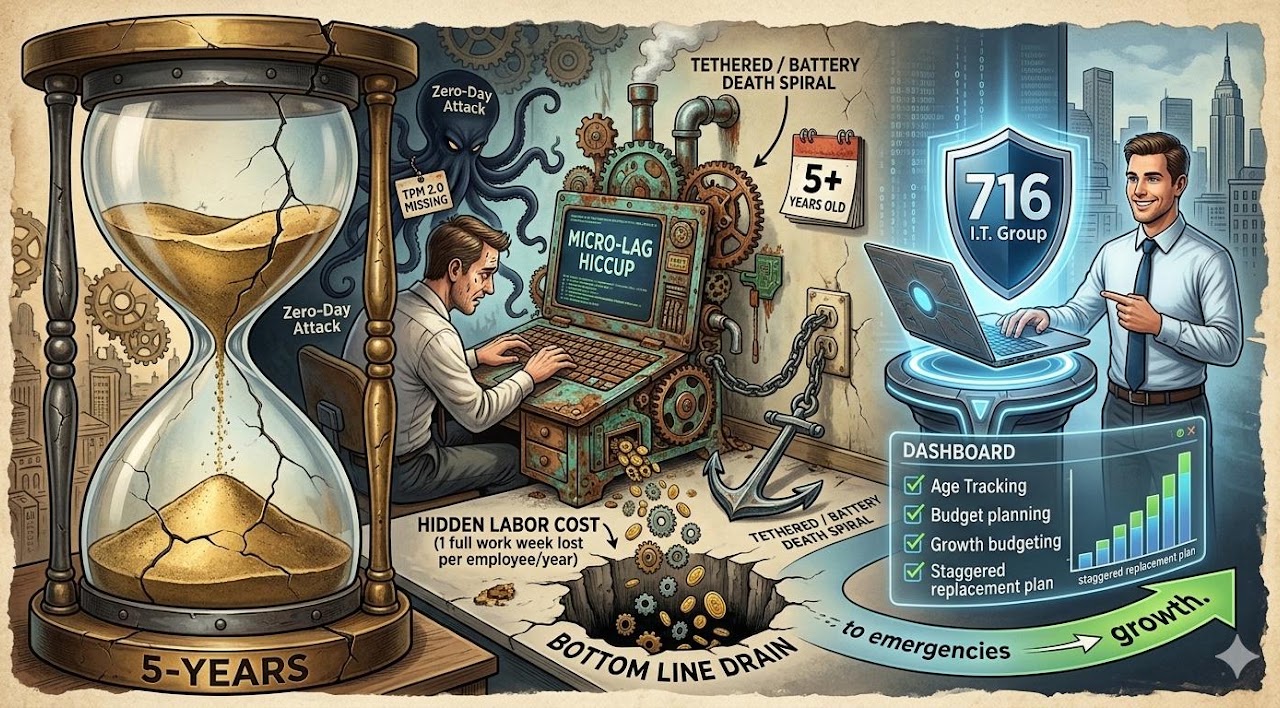
The 5-Year Hardware Rule: Is Your Old PC Actually Costing You Money?
Small businesses often try to "squeeze one more year" out of a 6-year-old laptop. While it feels like saving money, it’s actually a drain on your bottom line. Old hardware doesn't just "fail" one day; it degrades slowly, causing micro-lags, longer boot times, and compatibility issues with modern software like Teams or Zoom.
- The "Hidden Labor" Cost: If a 5-year-old PC takes 5 minutes longer to boot and "hiccups" for just 10 minutes a day, that’s one full work week of lost productivity per employee, per year.
- Security Gaps: Older processors lack hardware-level security features (like TPM 2.0) that protect against modern "Zero-Day" attacks.
- The Battery Death Spiral: By year 5, laptop batteries often lose 40-60% of their capacity, tethering your "mobile" workforce to a wall outlet.
The 716 IT Advantage
We don't believe in "buying new just because." We provide Lifecycle Management. We track the age and health of every device in your office and help you create a "staggered" replacement plan so you never have a massive, unexpected $10,000 hardware bill. Let us help you budget for growth, not for emergencies.
Quick Action Checklist
- Log the purchase year, warranty status, and specs of every workstation and laptop in your office.
- Replace 20–25% of your fleet each year on a staggered 4-to-5-year schedule instead of absorbing a single lump-sum emergency bill.
- Standardize on business-class laptops with TPM 2.0, SSD storage, and at least 16GB of RAM so devices stay fast for their full lifecycle.
Want a staggered hardware replacement plan for your office?
We audit device health, track warranties, and deploy pre-configured business PCs across Greater Buffalo & WNY.